2 days of judgement day was full of torture.
Looking forward for a better life tomorrow.
Saturday, July 23, 2011

Thursday, July 21, 2011
It's judgement day
21 July 2011 is my judgement day.
Never is my life that I have been judged in so many ways for a day.
I guess I have found the true meaning of LOVE.
Never is my life that I have been judged in so many ways for a day.
I guess I have found the true meaning of LOVE.
Monday, May 30, 2011
Wednesday, May 18, 2011

Thursday, April 14, 2011
Mikrotik RB750G IPv6
Home PC (WIN7/IPv4)--> RB250G(IPv4) --> RB750G(IPV4) -->Singtel ADSL(IPV4) --> tunnel broker(IPV6) --> IPv6/IPv4 web site
Tunnel broker
In this example we will use Hurricane Electric tunnel broker services.After registration click on "Create regular tunnel", enter your IP address and choose closest server to your location. That's it tunnel is now allocated.
Now go to tunnel details, where you will see all the parameters for successful tunnel creation and allocated IPv6 address block.
/interface 6to4
add disabled=no local-address=116.14.113.66 mtu=1280 name=sixbone \
remote-address=216.218.221.42
/ipv6 address
add address=2001:470:35:20::2/64 advertise=no disabled=no eui-64=no \
interface=sixbone
add address=2001:470:36:20::/64 advertise=yes disabled=no eui-64=no \
interface=ether2-master-local
/ipv6 route
add disabled=no distance=1 dst-address=::/0 gateway=2001:470:35:20::1 scope=30 \
target-scope=10
/ip dns
set allow-remote-requests=yes cache-max-ttl=1w cache-size=2048KiB max-udp-packet-size=512 \
servers=2001:470:20::2,74.82.42.42
The IPv6 testsite http://test-ipv6.com

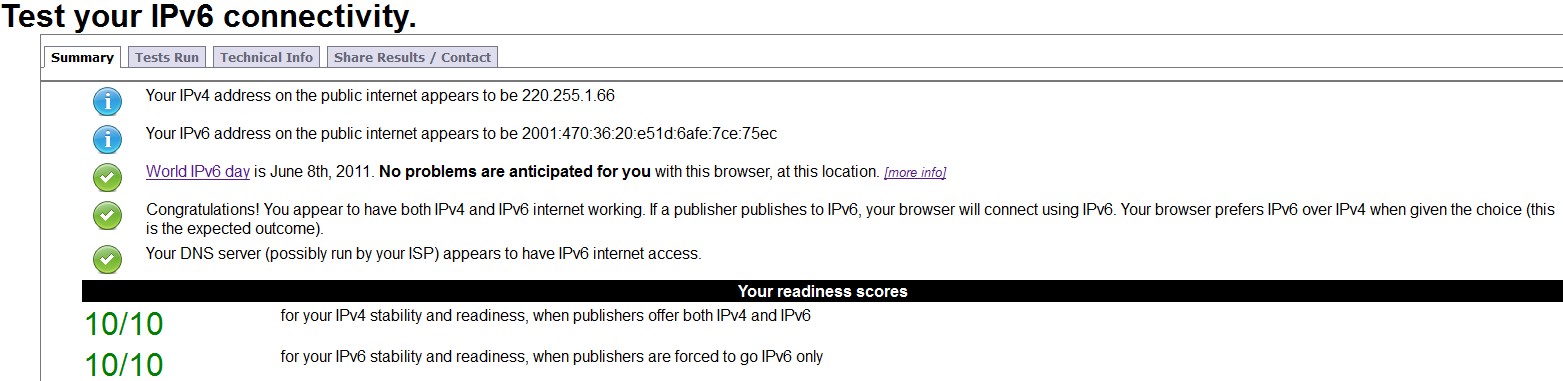
I'm changing the DNS to OpenDNS for it's Web Content Filtering.They are IPv6 ready.
/ip dns
set allow-remote-requests=yes cache-max-ttl=1w cache-size=2048KiB \max-udp-packet-size=512 servers=208.67.222.222,208.67.220.220
But there will be 1 test failed.

The only problem with the current setup is if your ISP is providing dynamic IP, you will need to recreate the tunnel everytime it changes.
Update....
Configuration provided by HE.
/interface 6to4 add comment="Hurricane Electric IPv6 Tunnel Broker" disabled=no local-address=42.60.79.157 mtu=1280 name=sit1 remote-address=216.218.221.42
/ipv6 route add comment="" disabled=no distance=1 dst-address=2000::/3 gateway=2001:470:35:20::1 scope=30 target-scope=10
/ipv6 address add address=2001:470:35:20::2/64 advertise=yes disabled=no eui-64=no interface=sit1
/ipv6 route add comment="" disabled=no distance=1 dst-address=2000::/3 gateway=2001:470:35:20::1 scope=30 target-scope=10
/ipv6 address add address=2001:470:35:20::2/64 advertise=yes disabled=no eui-64=no interface=sit1
Sunday, March 20, 2011
Recycle Dlink DNS-323 as a HTTP Proxy Server
Found the useful funplug polipo HTTP Proxy Server for DNS-323 from the original link.
Polipo is a fast caching and small web proxy (a web cache, a proxy server, an HTTP proxy).
Polipo is lightweight, has a web interface for configuration and has enough options (set in /ffp/etc/polipo/config) which I didn't change anything. Just use the default configuration and work just fine.
1. Funplug must be install in DNS-323
2. Download the funplug from the above link and place in the "/mnt/HD_a2/packages" directory.
/mnt/HD_a2/packages # ls -l polipo-1.0.4.tgz
-rwxrwxrwx 1 nobody 501 296622 Mar 18 22:37 polipo-1.0.4.tgz
3. funplug -i polipo-1.0.4.tgz
4. Reboot DNS-323
5. Check the process.
/mnt/HD_a2/packages # ps -ef|grep polipo
1745 root /ffp/bin/polipo -c /ffp/etc/polipo/config daemonise=true logFile="/ffp/var/log/polipo-deamon.log"
6. Set the browser proxy as the ip address of the DNS-323 and port 8123. example firefox.

For more detail u can check out the Developer site @ link
Polipo is a fast caching and small web proxy (a web cache, a proxy server, an HTTP proxy).
Polipo is lightweight, has a web interface for configuration and has enough options (set in /ffp/etc/polipo/config) which I didn't change anything. Just use the default configuration and work just fine.
1. Funplug must be install in DNS-323
2. Download the funplug from the above link and place in the "/mnt/HD_a2/packages" directory.
/mnt/HD_a2/packages # ls -l polipo-1.0.4.tgz
-rwxrwxrwx 1 nobody 501 296622 Mar 18 22:37 polipo-1.0.4.tgz
3. funplug -i polipo-1.0.4.tgz
4. Reboot DNS-323
5. Check the process.
/mnt/HD_a2/packages # ps -ef|grep polipo
1745 root /ffp/bin/polipo -c /ffp/etc/polipo/config daemonise=true logFile="/ffp/var/log/polipo-deamon.log"
6. Set the browser proxy as the ip address of the DNS-323 and port 8123. example firefox.

For more detail u can check out the Developer site @ link
Sunday, February 27, 2011


Subscribe to:
Posts (Atom)