Showing posts with label MikroTik. Show all posts

Saturday, May 24, 2014

Upgraded my home core router

 Upgraded my home core router to CCR1009-8G-1S-1S+ 699SGD.

Previous setup RB2011UAS-2HnD-IN

My new cloud core router arrived on 20 May 2014

New setup TP-LINK TL-WA901ND + CCR1009-8G-1S-1S+


Thursday, April 14, 2011

Mikrotik RB750G IPv6

Home PC (WIN7/IPv4)--> RB250G(IPv4) --> RB750G(IPV4) -->Singtel ADSL(IPV4) --> tunnel broker(IPV6) --> IPv6/IPv4 web site

Tunnel broker

In this example we will use Hurricane Electric tunnel broker services.
After registration click on "Create regular tunnel", enter your IP address and choose closest server to your location. That's it tunnel is now allocated.
Now go to tunnel details, where you will see all the parameters for successful tunnel creation and allocated IPv6 address block.

/interface 6to4
add disabled=no local-address=116.14.113.66 mtu=1280 name=sixbone \
    remote-address=216.218.221.42

/ipv6 address
add address=2001:470:35:20::2/64 advertise=no disabled=no eui-64=no \
    interface=sixbone
add address=2001:470:36:20::/64 advertise=yes disabled=no eui-64=no \
    interface=ether2-master-local

/ipv6 route
add disabled=no distance=1 dst-address=::/0 gateway=2001:470:35:20::1 scope=30 \
    target-scope=10

/ip dns
set allow-remote-requests=yes cache-max-ttl=1w cache-size=2048KiB max-udp-packet-size=512 \
    servers=2001:470:20::2,74.82.42.42

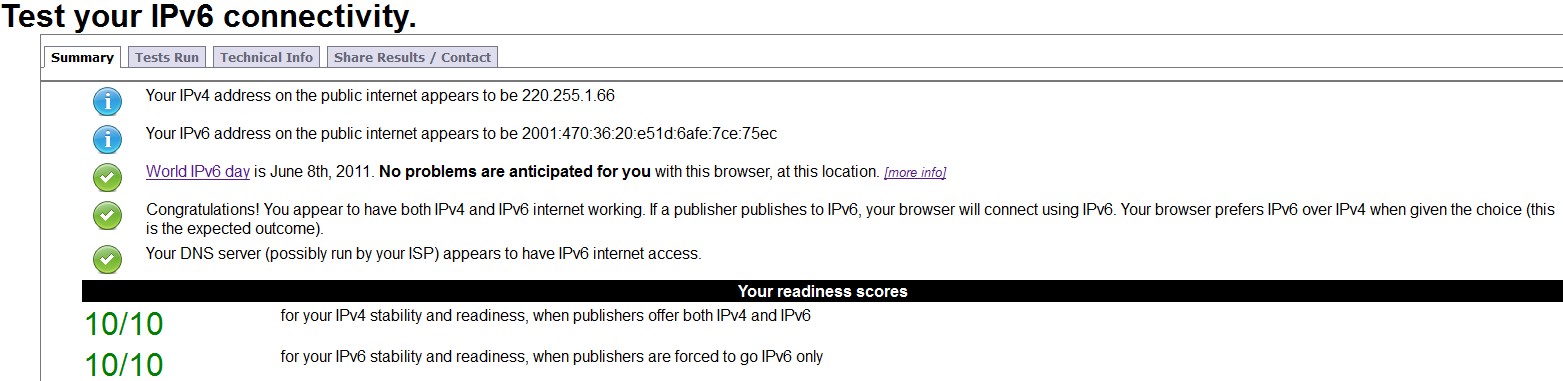
The IPv6 testsite http://test-ipv6.com


 I'm changing the DNS to OpenDNS for it's Web Content Filtering.They are IPv6 ready.
/ip dns
set allow-remote-requests=yes cache-max-ttl=1w cache-size=2048KiB \
    max-udp-packet-size=512 servers=208.67.222.222,208.67.220.220
But there will be 1 test failed.


The only problem with the current setup is if your ISP is providing dynamic IP, you will need to recreate the tunnel everytime it changes.

Update....
Configuration provided by HE.

/interface 6to4 add comment="Hurricane Electric IPv6 Tunnel Broker" disabled=no local-address=42.60.79.157 mtu=1280 name=sit1 remote-address=216.218.221.42
/ipv6 route add comment="" disabled=no distance=1 dst-address=2000::/3 gateway=2001:470:35:20::1 scope=30 target-scope=10
/ipv6 address add address=2001:470:35:20::2/64 advertise=yes disabled=no eui-64=no interface=sit1

Thursday, February 24, 2011

RB750G Forward Port

/ip firewall nat
add action=dst-nat chain=dstnat comment="" disabled=no dst-port=54434 \
    protocol=tcp to-addresses=192.168.0.109 to-ports=54434
add action=dst-nat chain=dstnat comment="" disabled=no dst-port=54434 \
    protocol=udp to-addresses=192.168.0.109 to-ports=54434

RB750G Static IP

/ip dhcp-server lease
add address=192.168.0.100 client-id=1:0:18:f3:b4:44:51 comment="" disabled=no \
    mac-address=00:18:F3:B4:44:51 server=default
add address=192.168.0.109 client-id=1:0:21:91:96:d0:54 comment="" disabled=no \
    mac-address=00:21:91:96:D0:54 server=default
add address=192.168.0.110 client-id=1:0:1b:11:4c:89:56 comment="" disabled=no \
    mac-address=00:1B:11:4C:89:56 server=default
add address=192.168.0.106 client-id=1:40:61:86:6:21:ae comment="" disabled=no \
    mac-address=40:61:86:06:21:AE server=default
add address=192.168.0.104 client-id=1:0:1c:c0:92:7e:1a comment="" disabled=no \
    mac-address=00:1C:C0:92:7E:1A server=default

RB750G configure to work with Singnet ADSL

1 ) Use Winbox to access the RB750G.
2 ) New Terminal
3 ) Issue this to reset to factory setting
/system reset-configuration no-defaults=yes
4 ) Remove the DHCP-Client setting.
5 ) After reboot, use Winbox to access the RB750G and paste the below setting.

/interface ethernet
set 0 arp=enabled auto-negotiation=yes bandwidth=unlimited/unlimited comment="" disabled=no full-duplex=yes l2mtu=1524 mac-address=00:0C:42:73:C1:AC \
    master-port=none mtu=1500 name=ether1-gateway speed=100Mbps
set 1 arp=enabled auto-negotiation=yes bandwidth=unlimited/unlimited comment="" disabled=no full-duplex=yes l2mtu=1524 mac-address=00:0C:42:73:C1:AD \
    master-port=none mtu=1500 name=ether2-local-master speed=100Mbps
set 2 arp=enabled auto-negotiation=yes bandwidth=unlimited/unlimited comment="" disabled=no full-duplex=yes l2mtu=1524 mac-address=00:0C:42:73:C1:AE \
    master-port=ether2-local-master mtu=1500 name=ether3-local-slave speed=100Mbps
set 3 arp=enabled auto-negotiation=yes bandwidth=unlimited/unlimited comment="" disabled=no full-duplex=yes l2mtu=1524 mac-address=00:0C:42:73:C1:AF \
    master-port=ether2-local-master mtu=1500 name=ether4-local-slave speed=100Mbps
set 4 arp=enabled auto-negotiation=yes bandwidth=unlimited/unlimited comment="" disabled=no full-duplex=yes l2mtu=1524 mac-address=00:0C:42:73:C1:B0 \
    master-port=ether2-local-master mtu=1500 name=ether5-local-slave speed=100Mbps

/ip address
add address=192.168.0.1/24 broadcast=192.168.0.255 comment="default configuration" disabled=no interface=ether2-local-master network=192.168.0.0

/ip pool
add name=default-dhcp ranges=192.168.0.10-192.168.0.254

/ip dhcp-server
add address-pool=default-dhcp authoritative=after-2sec-delay bootp-support=static disabled=no interface=ether2-local-master lease-time=3d name=default

/ip dhcp-server network
add address=192.168.0.0/24 comment="default configuration" dns-server=192.168.0.1 gateway=192.168.0.1

/ip dns
set allow-remote-requests=yes cache-max-ttl=1w cache-size=2048KiB max-udp-packet-size=512 \
    servers=208.67.222.222,208.67.220.220,165.21.100.88,165.21.83.88

/ip dns static
add address=192.168.0.1 comment="" disabled=no name=router ttl=1d

/interface pppoe-client
add ac-name="" add-default-route=yes allow=pap,chap,mschap1,mschap2 comment=\
    "" dial-on-demand=no disabled=no interface=ether1-gateway max-mru=1492 \
    max-mtu=1492 mrru=disabled name=pppoe-out1 password=XXXXXXXX profile=\
    default service-name="" use-peer-dns=yes user=username@singnet

/ip firewall nat
add action=masquerade chain=srcnat comment="default configuration" disabled=\
    no out-interface=pppoe-out1


/ip firewall filter
add action=accept chain=input comment="" disabled=no protocol=\
    icmp
add action=accept chain=input comment="" connection-state=\
    established disabled=no in-interface=pppoe-out1
add action=accept chain=forward comment="" connection-state=\
    related disabled=no in-interface=pppoe-out1
add action=drop chain=input comment="" disabled=no \
    in-interface=pppoe-out1


/system ntp client
set enabled=yes mode=unicast primary-ntp=61.67.210.241 secondary-ntp=\
    218.211.253.172

Tuesday, February 22, 2011

RouterBOARDS RB493G & R52Hn

Quoted the below price.

RB493G SGD270

R52Hn SGD85

Monday, February 21, 2011

Mikrotik Training

Found this site on Mikrotik Training Videos but have no time to try it out.

Friday, February 18, 2011

Routerboard RB750G

Hahaha...
Backside pain.... go and buy a routerboard RB750G SGD120.
Not a network guy and yet try to config the monster.
Anyway...
Here is link to the product